
Skip to content
Beepec
  • Services
  • Portfolio
  • Resources
  • About
  • Contact
  • Services
  • Portfolio
  • Resources
  • About
  • Contact
Place Order
  • Services
  • Portfolio
  • Resources
  • About
  • Contact
  • Services
  • Portfolio
  • Resources
  • About
  • Contact
Place Order

Getting Started

  • Q&A
  • Team Members Management
  • How to create account and place an order at BEEPEC Client Portal?
  • Streamlining Client Onboarding Process in BEEPEC Client Portal
  • Dashboard Overview

Orders

  • How to manage orders in BEEPEC Client Portal?

Invoices

  • How to manage invoices in BEEPEC Client Portal?

Balance

  • Streamline Your Payments with Our Balance Feature

API & Integrations

  • BEEPEC Orders API: connect your system to BEEPEC

Rewards

  • Get Rewarded for the Edits You Already Order: Introducing BEEPEC Rewards
View Categories
  • Home
  • Client Portal Help
  • Getting Started
  • Dashboard Overview

Dashboard Overview

< 1 min read

0:00 / 0:40
  • View as Markdown Open this page as plain Markdown (opens in a new tab)
  • Open in ChatGPT Ask questions about this page (opens in a new tab)
  • Open in Claude Ask questions about this page (opens in a new tab)
  • Open in Google AI Studio Ask questions about this page (Google account required) (opens in a new tab)

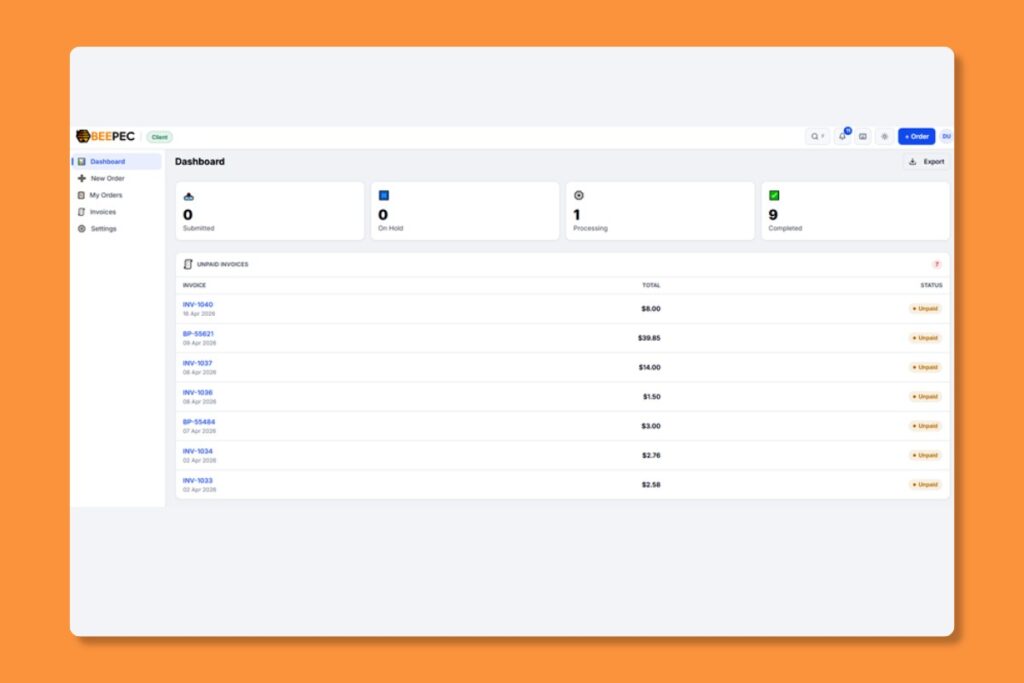
Your Dashboard is the first thing you see after logging in. It provides a snapshot of your activity.

Key Sections #

My Orders: See all orders in all statues (All, Draft, Submitted, Processing, On Hold, Completed, Cancelled) and currently in progress with real-time status updates.
Recent Deliveries: Quick access to your latest completed orders and download links.
Account Balance: View your current prepaid balance and add funds.
Quick Actions” One-click access to “New Order” and other frequent tasks.

Sidebar Navigation #

Use the left sidebar to navigate between:

  • Dashboard” Your home overview
  • New Order: Place new order(s)
  • My Orders: Full list of all your orders
  • Invoices: Billing history and payment management
  • Settings: Profile, style preferences, and team management
What are your Feelings

Share This Article :

  • Facebook
  • X
  • LinkedIn
  • Pinterest
Still stuck? How can we help?

How can we help?

Updated on April 17, 2026
Table of Contents
  • Key Sections
  • Sidebar Navigation
Beepec

Professional real estate photo post‑production.

Explore

  • Services
  • Portfolio
  • About
  • Contact

Resources

  • Blog
  • FAQ
  • API

Contact

  • contact@beepec.com

Hanoi, Vietnam (UTC+7)

  • Place Order
  • Facebook
  • Instagram
  • YouTube

© 2026 BEEPEC. All rights reserved.

  • Privacy Policy
  • Terms of Service
  • Sitemap